
LawKPIs products
One operating layer. Three ways to receive it.
See your numbers, get a morning briefing, or just ask. NyxO does the analysis behind all three.
LawKPIs connects your practice management, accounting and intake systems. NyxO, our AI, analyzes that data every day. You choose how you want to use it: in the platform, in your inbox or inside the AI assistant you already use.
See it
Dashboards + NyxO Insights
Your firm's numbers and the NyxO AI Data Coach, in one place.
Best for leadership and finance teams
Receive it
Daily Pulse
What needs attention today, in your inbox every morning.
Best for partners who want the headlines in 60 seconds
Ask it
LawKPIs Connector
Ask about your firm inside Claude.
Best for anyone who already works in an AI assistant
Trusted by 150+ law firms · Live in 5 days · Daily Pulse included with every subscription.
The honest comparison
“Doesn't our practice management system already have reporting?”
LawKPIs is a layer on top of your practice management, accounting and intake systems — it doesn't replace them. The firm keeps working in the system it knows; LawKPIs makes the numbers it produces usable.
Built-in practice management reports
LawKPIs + NyxO
What changed, and why
Built-in practice management reports
Shows the number — say, realization at 86% — and leaves you to work out what moved it and whether it matters.
LawKPIs + NyxO
NyxO explains the change in plain English: what moved, by how much, and what to do next.
One joined picture
Built-in practice management reports
Reports cover one system at a time. Joining practice management with accounting and intake means exporting to spreadsheets and rebuilding the view by hand.
LawKPIs + NyxO
Practice management, accounting and intake are joined in one view — the same numbers everywhere, no exports.
Who should act
Built-in practice management reports
A report has no owner. Everyone can see the same numbers; nobody is pointed at the next step.
LawKPIs + NyxO
NyxO flags who should act and what to do, so a number becomes a conversation with a name on it.
How it arrives
Built-in practice management reports
Sits inside the system until someone logs in and goes looking for it.
LawKPIs + NyxO
Daily Pulse delivers what needs attention to your inbox every morning, ranked by dollar impact.
Built-in reports remain useful for what they do — this is about the layer on top.
The honest answer
"Why not just ask Claude or ChatGPT?"
General AI assistants are powerful reasoning tools — many of us use them every day. The limitation isn't the model; it's what it can see. Without your firm's connected data, even the best model is guessing.
Claude or ChatGPT on their own
NyxO, inside LawKPIs
Your operating data
Claude or ChatGPT on their own
On their own, they don't inherently have your firm's normalized practice-management and accounting data — the day-by-day numbers behind every answer.
NyxO, inside LawKPIs
LawKPIs joins those systems daily, so NyxO answers from your firm's real numbers.
Your firm's rules
Claude or ChatGPT on their own
They only know the targets, thresholds and firm-specific rules you provide in the conversation.
NyxO, inside LawKPIs
NyxO applies your firm's rules and benchmarks, so a flag means something specific to your firm.
Historical context
Claude or ChatGPT on their own
They can reason over the history you provide, but don't inherently have your connected month-by-month operating record.
NyxO, inside LawKPIs
LawKPIs keeps the history, so NyxO can say what changed, by how much, and since when.
Who should act
Claude or ChatGPT on their own
They can suggest a next step, but need your firm-specific roles and operating context to identify the right owner.
NyxO, inside LawKPIs
NyxO flags who should act and what to do, so every answer ends somewhere.
And when you do want an AI assistant in the conversation?
Use them — through the LawKPIs Connector. It brings your firm's real numbers into Claude, so you get the reasoning power of a general assistant with the grounded data of LawKPIs behind it. LawKPIs works with Claude, not instead of it.
How the Connector worksHow it fits together
One platform. One intelligence layer. Three ways it reaches you.
LawKPIs is the platform. NyxO is the intelligence inside it. Daily Pulse and the Connector are how that intelligence reaches you.
Firm data
Practice management · Accounting · Intake
The platform
LawKPIs
The AI-powered operating layer.
NyxO
The intelligence layer that analyzes the firm's data.
See it — in the platform
Dashboards
Your firm's numbers, explained by the NyxO AI Data Coach.
Receive it — in your inbox
Daily Pulse
Proactive intelligence delivered every morning.
Ask it — in Claude
LawKPIs Connector
Conversational access through Claude.
Action
The right person sees it and acts — and NyxO tracks it until it's resolved.
NyxO Qualify
A separate product for lead qualification.
Sold separately — it is not part of the flow above. Every LawKPIs plan already includes Dashboards, Daily Pulse and the Connector.
Used by law firms every day
Built for the firms doing the work.
LawKPIs supports firms across practice areas, operating models and markets.

Align Family Law 
Clawson & Staubes (CS) Law 
Galbut Beabeau (GB Law) 
GTX Legal 
Kaufman Hilbert 
Limbaugh Law 
MFB Solicitors 
Oak Grove Estate Planning 
Rayburn Cooper & Durham, P.A. 
Sloto & Diamond Attorneys at Law 
Strategy Law LLP 
Thomas, Fisher & Edwards


At a glance
LawKPIs
- What it does
- Your firm's numbers, explained by an AI coach
- Where you use it
- The LawKPIs platform, in your browser
- Time it takes
- A few minutes a day
- Main benefit
- One trustworthy view of the whole firm
- Included
- Every plan
Daily Pulse
- What it does
- A morning briefing on what needs attention
- Where you use it
- Your inbox
- Time it takes
- Under 60 seconds
- Main benefit
- Never wait until month-end to spot a problem
- Included
- Every plan, for your whole team
LawKPIs Connector
- What it does
- Ask about your firm inside Claude
- Where you use it
- Claude, wherever you already work
- Time it takes
- As long as it takes to type a question
- Main benefit
- No new tool, no new login
- Included
- Every plan
See it · Dashboards + NyxO Insights
Your whole firm in one view, with an AI coach that tells you what the numbers mean.
What it is
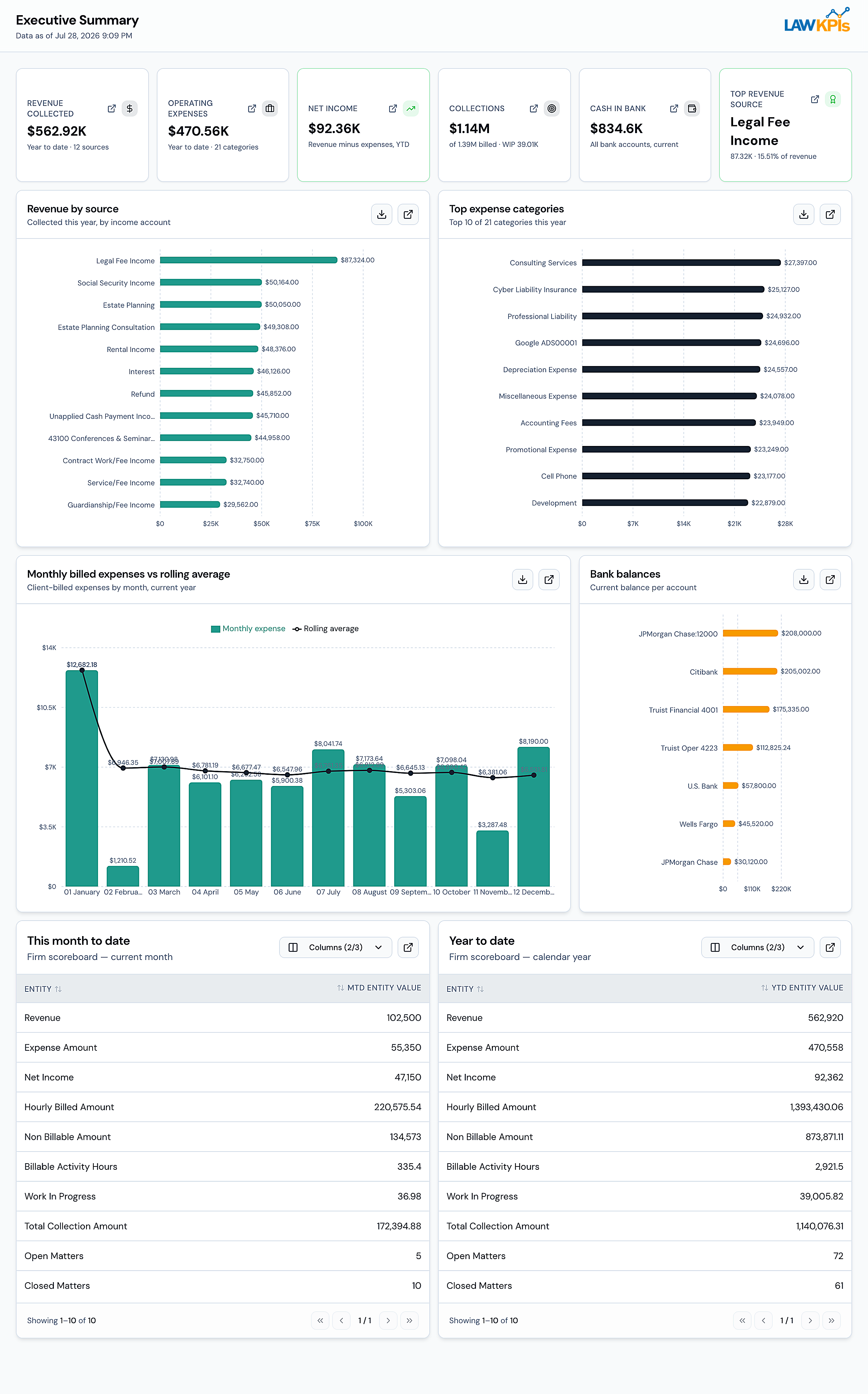
LawKPIs joins your practice management, accounting, and intake data into one place, and the NyxO AI Data Coach explains what's actually happening in plain English — not just charts, but what changed, why, and what to do next.
What you get
Revenue & Collections
See what's billed, what's actually collected, and where the gap between the two is widening — broken down by attorney, practice area, and matter.
Attorney Performance
Utilization, realization, and billable-hour targets for every attorney, ranked side by side so you know exactly who needs a conversation.
Matter Profitability
Net profit or loss on every matter — including flat-fee work — so you can see which files are quietly losing money before the file closes.
Practice Area Economics
Billed, collected, WIP, and effective rate for every practice area, so you know which parts of the firm are actually carrying the business.
Marketing & Intake
Track leads from source to signed client, and see which referral sources and campaigns are actually converting into revenue.
Benchmarks
See how your firm's numbers compare to similar firms by size and practice area, so you know whether a number is actually a problem or just normal.
Who it's for
Built for managing partners, firm administrators, and operations leaders who need one trustworthy view of the firm's numbers, without building it by hand every week.
Meet your NyxO AI Data Coach
- Explains every change
- Answers in plain English
- Points you to the next step
- Shows its work
Click a sample question to see how NyxO answers — the direct answer, the numbers behind it, the explanation and the next step.
Sample data
You ask
Why did revenue fall this month?
Direct answer
Billed work held steady — collections didn't. The firm collected $501,400 this month against $545,000 last month.
- Collections this month
- $501,400
- Prior month
- $545,000
- Change
- −8% · −$43,600
Explanation
The gap is collections, not billings: three clients account for $31,400 of the $43,600 decline (72%). The rest is spread across smaller accounts with no single pattern.
Recommended next step
Billing Manager follows up with the three clients within 5 business days. NyxO flags the issue and names the owner — the follow-up itself stays with your team.
See it in action
A short overview of the NyxO AI Data Coach.
One place to see whether the firm is actually making money — not a spreadsheet anyone has to rebuild.
What to expect
What LawKPIs does — and doesn't do.
LawKPIs works alongside the systems your firm already runs. Here is exactly what it takes on, and what it leaves alone.
What LawKPIs does
Connects to your existing systems
Practice management, accounting and intake — read-only.
Reads only authorized data
Same permissions as your LawKPIs account.
Normalizes it into one view
One consistent set of numbers across the firm.
Analyzes performance daily
Revenue, collections, realization, matter profitability.
Explains what changed and why
In plain English, not just charts.
Delivers proactive intelligence
Daily Pulse, the platform, and the Connector.
What LawKPIs doesn't do
Doesn't replace your systems
The firm keeps working in its practice management and accounting systems.
Doesn't modify source records
Access is read-only — nothing is written back to your systems.
Doesn't need manual spreadsheets
No weekly report-building; the numbers arrive on their own.
Your firm's systems stay exactly where they are. LawKPIs reads their data and makes it usable.
Receive it · Daily Pulse
What needs your attention today, in your inbox before your first meeting.
What it is
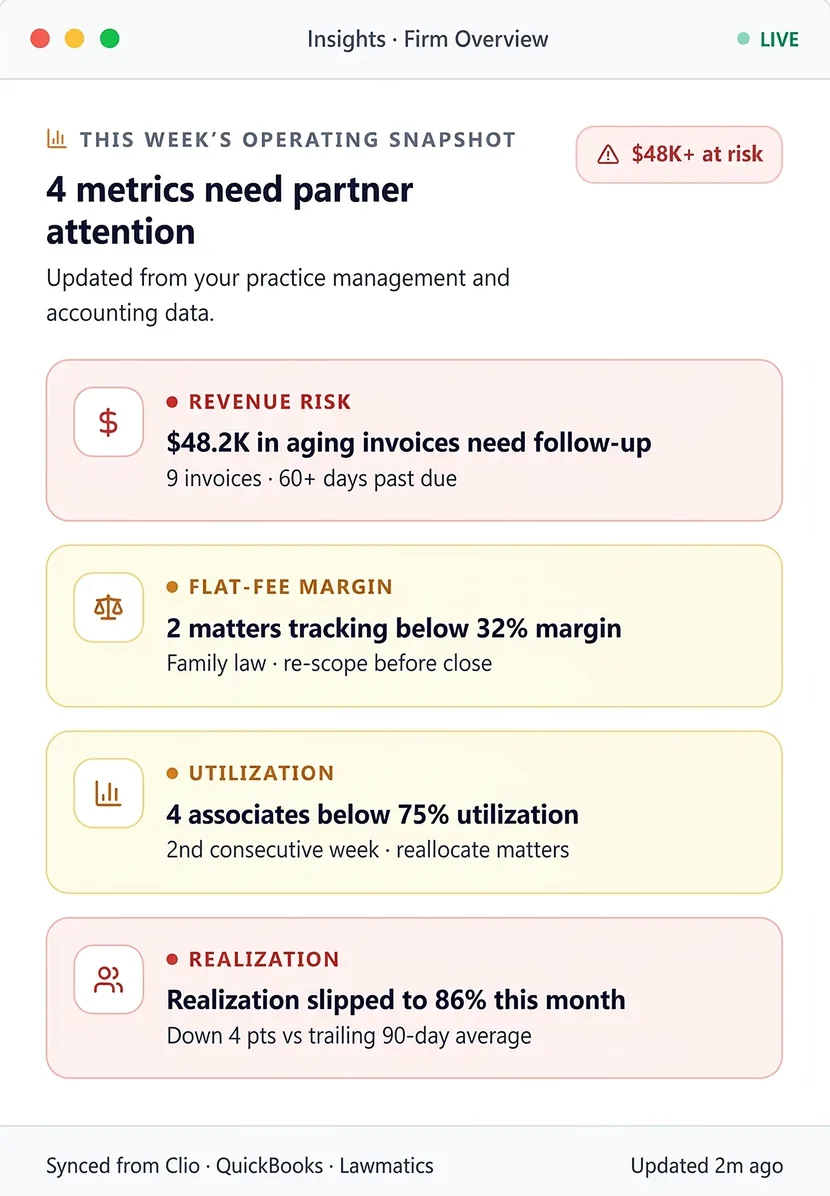
Daily Pulse is a short email that arrives every morning with the handful of things that actually need your attention that day — ranked by dollar impact, not buried in a report you have to go find.
What you get
A focused briefing, not a report
A handful of flagged items, not a wall of numbers — built to be read in under 60 seconds before your first meeting.
The why and the next step
Every flag comes with the reason it's flagged and who should act on it, not just a number that changed.
Right message, right person
Configure who gets what — a managing partner doesn't need the same Daily Pulse as a billing coordinator.
No repeats
Once something's resolved, it drops off the next day's Pulse — you're never re-reading yesterday's problem.
You choose who gets it
Daily Pulse can go to anyone at the firm, by role, with or without a LawKPIs login.
Who it's for
Built for partners and firm leaders who want the headlines without logging into a dashboard — read it on your phone before you're at your desk.
Included with every LawKPIs subscription.
See a sample Daily PulseAsk it · LawKPIs Connector
Ask about your firm right inside Claude.
What it is
The LawKPIs Connector lets you ask about your firm's numbers directly inside Claude, using the AI assistant you already have open — no new tool to learn.
What you get
Answers where you already work
Ask in Claude and get an answer built from the LawKPIs reports available to your account — no separate app to open.
Your real data, not guesses
Claude uses the reports and firms available through your LawKPIs account.
Go from answer to action
Follow up with a second question the way you would with a colleague — for example, which of those matters are with the same attorney.
Reports on demand
Ask for a breakdown or export the AR aging report as a PDF.
Same permissions as LawKPIs
The Connector only shows you what you already have access to inside LawKPIs — it doesn't widen anyone's access.
Starter questions included
A short list of ready-made questions gets you started the first time, so you're not staring at a blank prompt.
Who it's for
Built for anyone at the firm who already works inside Claude and wants firm numbers without switching tools.
You ask Claude
Which attorneys are below their billable-hour target this month, and by how much?
Claude, using LawKPIs
Three attorneys are below their billable-hour target this month: Maria Chen is 14 hours under, James Ferro is 9 hours under, and Alicia Reyes is 6 hours under — all three are in the Family Law group.
Sample data
About 5 minutes
Claude setup
Paid Claude plan
Plus your LawKPIs login
One time
Complete it on a computer
Which experience fits whom
Each role gets what it needs from the same intelligence.
Managing Partner
Decisions
Matters most
Daily Pulse + Dashboards
The morning headlines, then the full picture when a decision needs the numbers behind it.
COO / Firm Admin
Intervention and follow-up
Matters most
Dashboards + NyxO Insights
See what changed, why, and who should act — then track it until it's resolved.
Attorney
Actions
Matters most
Daily Pulse
Only the items flagged for them, with the next step, without logging into a dashboard.
Power users
Answers on demand
Matters most
LawKPIs Connector
Ask follow-up questions about firm numbers inside Claude.
The honest answer
Why LawKPIs alongside your practice management system?
Your systems run their parts of the firm well, and we think they should keep doing it. What none of them does is connect the signals across all of them — that's the layer LawKPIs adds.
System
What it runs
What LawKPIs adds
Practice management
Clio, MyCase, Smokeball, Lawcus and CasePeer
Runs your matters, time and billing.
What LawKPIs adds
Connects matter, time and billing activity with collections, profitability and intake signals.
Accounting
QuickBooks Online
Keeps the firm's financial records.
What LawKPIs adds
Connects financial records with the matters and practice areas that produced them.
Intake / CRM
Lawmatics
Manages your leads and new clients.
What LawKPIs adds
Connects lead sources and signed clients with the revenue and collections that follow.
LawKPIs + NyxO
Read-only connection to each system
Connects the signals across all of them.
NyxO explains what changed across practice management, accounting and intake — and flags who should act.
Your firm keeps working in the systems it knows. LawKPIs reads their data — read-only and encrypted — and makes the numbers usable together. LawKPIs does not train AI models on customer data. External AI providers’ current data-use and privacy terms apply to their processing.
Connect once. Use it everywhere.
Connect once, and NyxO's analysis is available in the platform, in your inbox, and inside Claude — the same data, the same permissions, wherever you already work.
A typical morning
7:30am
Daily Pulse flags something.
9:00am
The partner asks the Data Coach a follow-up.
11:00am
The partner asks Claude, through the Connector, for a summary before a meeting.
Read-only access · Encrypted in transit and at rest · Never used to train AI models · Same permissions across all three products
SecurityProduct FAQ
Do I have to buy all three?
No. Every LawKPIs plan includes Dashboards with NyxO Insights, Daily Pulse and the LawKPIs Connector. NyxO Qualify is the only product sold separately.
Is NyxO a separate product?
No. NyxO is the AI layer built into LawKPIs, not something bought on its own. NyxO Qualify is a separate product for qualifying prospective clients before intake.
Who gets Daily Pulse?
Anyone at the firm, by role, with or without a LawKPIs login.
What data does the Connector share with an AI provider?
The Connector sends only the data the requesting user is already authorized to access, and only when the selected model requests it through a tool call. The Connector currently works with Claude, chosen by the user. Once data reaches that provider, the provider’s current data-use and privacy terms apply.
Do we need ChatGPT or Claude?
No. You only need Claude to use the Connector. Dashboards, NyxO Insights and Daily Pulse work without a separate Claude account.
Will the numbers match across products?
Yes. Dashboards, Daily Pulse and the Connector read from the same underlying LawKPIs data.
See all three in action.
In 30 minutes, we'll show you LawKPIs, a sample Daily Pulse and the Connector using sample data.
Live in 5 days · Daily Pulse included · Built for law firms with approximately $1.5M–$10M in annual revenue and 10–100+ employees, across North America, the UK/Europe, and Australia/APAC.